Your personas.
Your models.
Your machine.

AIcove is a desktop chat for Linux that runs personas on local models with llama.cpp. No browser, no server, no account. Everything is plain files you can read, edit and copy to your next machine.

LinuxPyQt6llama.cppoffline by defaultplain files
AIcove logo: a cozy room with an armchair inside the letter A

Why AIcove exists

We liked Open WebUI. It did what we needed, until it started growing into something we didn't need.

User management, teams, permissions, collaboration features, additional services and an increasingly large dependency stack. All useful to somebody, no doubt. But not to someone sitting at their own Linux machine, wanting a private conversation with a locally running AI.

Our Open WebUI install took almost 3.6 GB of disk space before a single model was downloaded, and it felt considerably slower. That's an extraordinary amount of infrastructure for what we actually wanted: a window to talk to our personas.

So we built AIcove.

Linux first, not as an afterthought

AIcove is a native PyQt6 desktop application, developed on Slackware. No browser frontend, no Electron, no separate web application server.

One person, one private environment

AIcove has no user accounts, shared workspaces, team permissions or remote access interface, and it opens no network port of its own. It communicates with a locally running llama-server. Web access is optional and explicitly enabled per conversation. File access is restricted and controlled by the user.

Small and fast

AIcove doesn't need a browser engine and an entire web application stack to display a conversation. It starts quickly, uses few resources and leaves your memory and processing power available for the models that actually need them.

Personas before models

You choose who you want to talk to, not which model you want to operate. Each persona has its own identity, knowledge, memories and conversation history. The underlying model can change without losing that history.

Your files, your control

Conversations, persona definitions, memories and notes live in ordinary, readable files. Open them in your favourite editor, back them up with rsync or move them to another machine. Nothing is locked away in an opaque application database. Permanent memories are accepted by you, not silently decided by the model.

We aren't trying to recreate every feature of Open WebUI, SillyTavern or the growing collection of AI platforms. AIcove is deliberately designed for a narrower purpose: giving one person a fast, private, portable and comfortable environment for their local AI personas.

We believe software should serve its user, not require its user to administer an increasingly complicated software platform.

Your RAM is for your models, not your chat interface.

In action

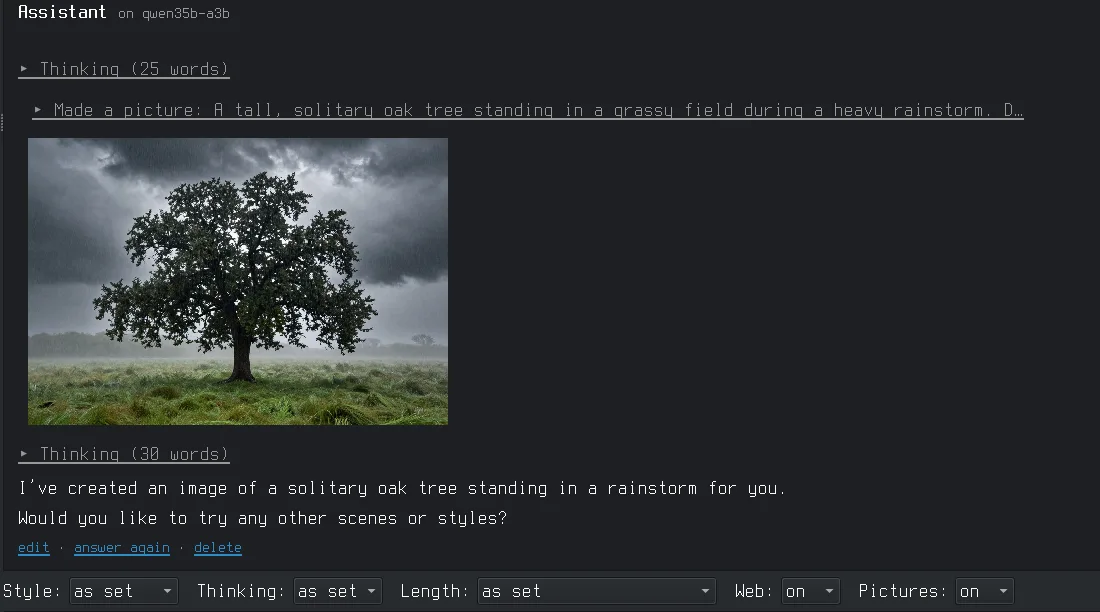
Ask for a picture and the persona makes it, right in the chat. The model, the image server and the chat all run on one laptop; nothing leaves it.

AIcove's chat: the Assistant persona on Qwen3.6-35B-A3B made a picture of an oak tree in the rain, shown under the answer.
The Assistant on Qwen3.6-35B-A3B (llama.cpp), picture by Z-Image-Turbo (stable-diffusion.cpp), on an AMD Ryzen AI laptop.

Persona first

You don't start a model, you start a persona: a name, a picture, a system prompt, its settings and the models it may run on. Starting it loads its model. Each persona has a folder of its own with its chats, knowledge and notes.

Chat that stays yours

Streaming answers, thinking shown folded, Markdown and code rendered. Edit, regenerate, continue. Chats are JSON files in the persona's folder.

Long chats, summarised

When a chat outgrows the context, the older part is summarised by the model. The summary is visible above the messages, and you can edit it.

Facts you approve

On one click the persona proposes what to remember across chats. You keep, edit or drop each fact. Nothing goes in without you.

Knowledge folder

Drop documents and PDFs into a persona's knowledge folder. Small ones go into the prompt, big ones are searched and read by the model when needed.

Per-chat controls

Style, thinking on or off, answer length, web search and pictures, set above the input for each chat.

File access, asked

A persona can be allowed to read folders you name and write text files, each change shown first for your OK. No shell commands, ever.

Launchers

Each model with its settings as a form, with an estimate of the memory it needs. Add models from a Hugging Face link and see which version fits your machine.

Web only when you say

Web search is off until you switch it on in a chat: DuckDuckGo or your own SearXNG. Addresses on your machine or home network are never fetched.

Writing

For long texts: a novel, a fic, thirty chapters and a hundred thousand words. A persona of yours reads along as editor or writing partner, and nothing it writes goes into your text without your OK.

Chapters as files

A project is a folder of Markdown chapters, one line per paragraph, saved as you type and versioned with git if you like. Import pasted text, an HTML download or a PDF and it is split into chapters for you.

Changes in red and green

Select a passage and ask: fix my English, make it more ominous, expand the scene. The new version comes into the chapter word by word, old text struck through, new text in green. Accept, decline or edit each change.

Review, not rewrite

A checker counts what can be counted: phrases from your own slop list, gestures piling up, long runs of dialogue, repetition. Then the persona reads the chapter as an editor and writes notes, which stay on their passage while you edit. The text stays yours.

A memory of the story

No model reads a whole novel at every question. Each chapter is read once into a note, with a cast and a list of open threads, chapter by chapter. Correct what is wrong: your corrections are locked.

Your style, your plans

Write down what you are going for and where the story goes. It travels with every question and review, so the model judges by your aim, not its own taste.

Out the door

Copy a chapter as clean HTML for AO3, or export the whole project as Markdown, text, HTML, PDF, EPUB or Word. No extra programs needed.

Your own templates, your own personas, any uncensored model you like: dark themes and explicit scenes are kept exactly as written, never softened.

Agents

A persona with a standing task. It works on its own, now or on a schedule, and comes back with reports, for example a story hunter that searches the web for your themes and writes each find up with its sources and the facts to check.

Reports, not chats

Each find is a small article with the pages it really read as sources. Keep, use or dismiss it; that becomes its sense of your taste. "Work on it" opens a chat with the report in it.

Narrow by design

An agent may search the web and read pages, and save reports in its own folder. Nothing else: no files of yours, no commands. Limits on searches, pages and minutes per run.

On your machines

It runs on the machine it lives on, also with the window closed (a cron line you switch on). Its searches can go out from another machine of yours, through its own SearXNG.

Optional modules

Off until you set them up. AIcove ships no models of its own; it talks to what you run.

optional

Voices

Personas read their answers aloud through a voice server with a tiny Gradio API (VoxCPM, XTTS, Piper, ...). Audio is kept as MP3 and deleted when no chat needs it.

optional

Pictures

Personas make pictures in the chat through any OpenAI-style image server, such as stable-diffusion.cpp's sd-server.

optional

Passwords

A small password manager on GnuPG, compatible with pass. The clipboard empties after 45 seconds, and sync between machines goes through git.

optional

Tools

Start and stop the other things on your machine from one tab: voice servers, image servers, local web servers, with buttons of your own.

Install

Needs Linux, Python 3.11+, PyQt6, python-markdown, Pygments and curl, and a llama.cpp build with llama-server.

# Arch / Manjaro
sudo pacman -S python-pyqt6 python-markdown python-pygments
# Debian / Ubuntu
sudo apt install python3-pyqt6 python3-markdown python3-pygments

git clone https://github.com/overcatbe/aicove.git ~/Projects/aicove
~/Projects/aicove/install.sh

The program runs from the cloned folder; updating is git pull there. The first start opens the Settings tab filled with what it found on your machine: llama-server, your model folder, your GPU. Correct it, press Check, then Save. The built-in guide on the Documentation tab explains the rest.